Forbidden Paths (Medium)
- Challenge Link: https://play.picoctf.org/practice/challenge/270?category=1&difficulty=2&page=2
- Challenge Description: We know that the website files live in /usr/share/nginx/html/ and the flag is at /flag.txt but the website is filtering absolute file paths. Can you get past the filter to read the flag?
Solution
To find the flag, we need to understand the basic but super important filesystem concept.
Absolute path:
- An absolute path is the full address of a file or folder, starting from the root of the filesystem.
- It always starts at the root
- It does not depend on where you currently are
Example: macOS / Linux
/home/alex/Documents/notes.txt
/etc/passwd
Example: Windows
C:\Users\Alex\Documents\notes.txt
No matter where you are, that path points to the same file.
Relative path:
- A relative path is written relative to your current directory (where your program or terminal is “standing”).
- It depends on where you are right now.
Example: If your current directory is:
/home/alex/projects/app/
And you write:
data/file.txt
It turns out to be:
/home/alex/projects/app/data/file.txt
One more thing:
.	current directory
..	parent directory (go up one level)
Example: if you are in /home/alex/projects/app/

.. → /home/alex/projects/

../.. → /home/alex/

../../Documents/file.txt → /home/alex/Documents/file.txt
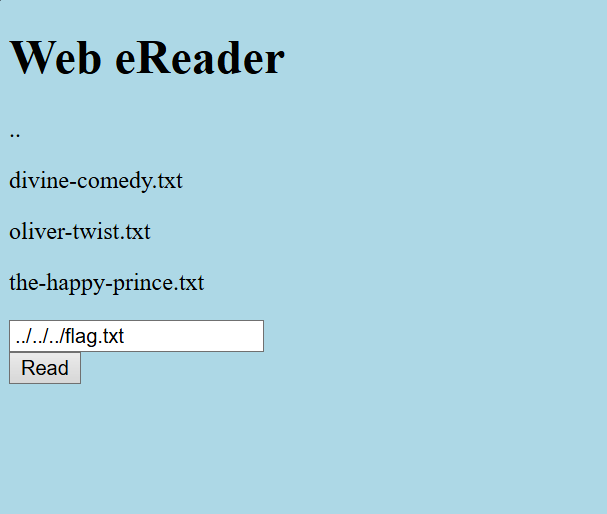
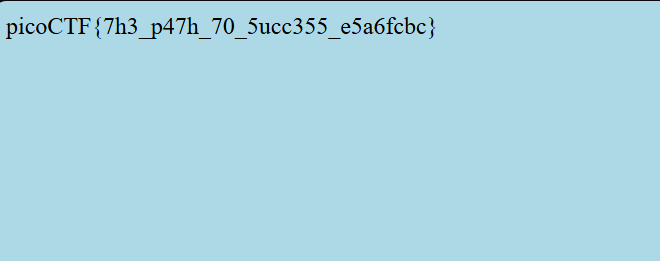
So to get the flag, we need to traverse the directory by adding as much ../ we need, you can keep adding that and then jsut add flag.txt at the end to get our flag.
../../../flag.txt works
../../../../../../../../../../../../../../../../flag.txt works as well
They work since we are trying to get to the root directory.
Sources
- N/A