3v@l (Medium)
- Challenge Link: https://play.picoctf.org/practice/challenge/484?category=1&difficulty=2&page=1
- Challenge Description: ABC Bank's website has a loan calculator to help its clients calculate the amount they pay if they take a loan from the bank. Unfortunately, they are using an eval function to calculate the loan. Bypassing this will give you Remote Code Execution (RCE). Can you exploit the bank's calculator and read the flag? Additional details will be available after launching your challenge instance.
- Hints:
- Bypass regex
- The flag file is /flag.txt
- You might need encoding or dynamic construction to bypass restrictions
Solution
If we look at the page source code, we can see that it's detecting certain keywords and using Regex.
    TODO
    ------------
    Secure python_flask eval execution by
        1.blocking malcious keyword like os,eval,exec,bind,connect,python,socket,ls,cat,shell,bind
        2.Implementing regex: r'0x[0-9A-Fa-f]+|\\u[0-9A-Fa-f]{4}|%[0-9A-Fa-f]{2}|\.[A-Za-z0-9]{1,3}\b|[\\\/]|\.\.'
So if we try to read the flag.txt file, it wouldn't work since the regex detects the keyword .txt which is not allowed.
open('flag.txt').read()
If we analyze this using a regular expression tool, we know that this regex is a bunch of OR conditions stuck together.
| --> OR
0x[0-9A-Fa-f]+ Detects hex numbers like:
0x1
0xA
0xdeadBEEF
0x123abc

0x --> literally the characters 0x

[0-9A-Fa-f] --> any hex digit (0-9),(A-F),(a-f)

+ --> one or more of the thing before it
\u[0-9A-Fa-f]{4} Detects unicode escape sequences like:
\u0041   (A)
\u002e   (.)

So \\u matches the text \u

{4} means exactly 4 of the thing before it
\u0000 → \uFFFF
%[0-9A-Fa-f]{2} Detects URL-encoded bytes like:
%2e   (.)
%2f   (/)
%41   (A)

% → literal percent sign
[0-9A-Fa-f]{2} → exactly two hex digits
.[A-Za-z0-9]{1,3}\b Detects short file extensions:
.txt
.php
.js
.py
.exe

\. → literal dot

[A-Za-z0-9] → letter or number

{1,3} → 1 to 3 characters

\b → word boundary (end of word)
[\/] Detects either slash:
/
\

[] → “any ONE of these”

\\ → backslash

\/ → forward slash
.. Detects:
..

Classic directory traversal (../).
Quick summary:
`	means `
+	means 1 or more
{n}	means exactly n
{n,m}	means between n and m
[] means any one character inside
\.	means the literal dot
\b	means the word boundary
But there are some ways we can bypass this, for example:
Unicode characters (not escaped)
/   (Unicode slash)
.   (Unicode dot)

Long extensions
.filebackup
.php123

More than two dots
...
....

Mixed or double encoding
%252e   (decodes to %2e)

Whitespace tricks
. ./
.\n.
So as we mentioned earlier, this code does not work because / → blocked by [\/] and .txt → blocked by .[A-Za-z0-9]{1,3}
open('flag.txt').read()
However, if we try this:
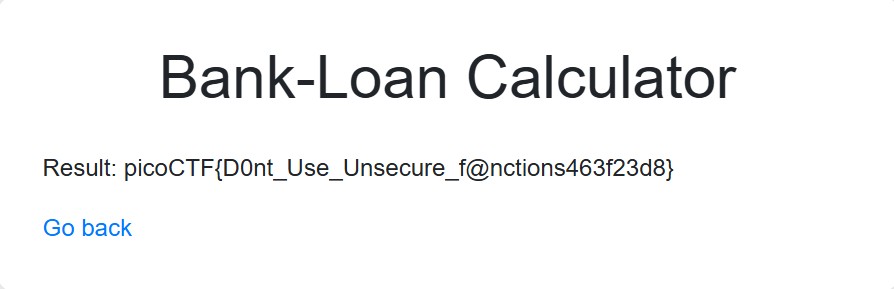
open(chr(47)+'f'+'l'+'a'+'g'+'.'+'t'+'x'+'t').read()
This works because the regex checks your input before Python executes it.
According the Ascii Table, chr(47) maps to /
Regex sees: chr(47)
Regex does not see: /

For 'f'+'l'+'a'+'g'+'.'+'t'+'x'+'t'
The regex rule: \.[A-Za-z0-9]{1,3}\b blocks .txt
Regex sees: 'f'+'l'+'a'+'g'+'.'+'t'+'x'+'t'
Regex does not see the output: flag.txt
Biggest takeaway is that Regex does not:
- Evaluate expression
- Execute functions
- Track string building
- Understand Python syntax
- Just matches text patterns